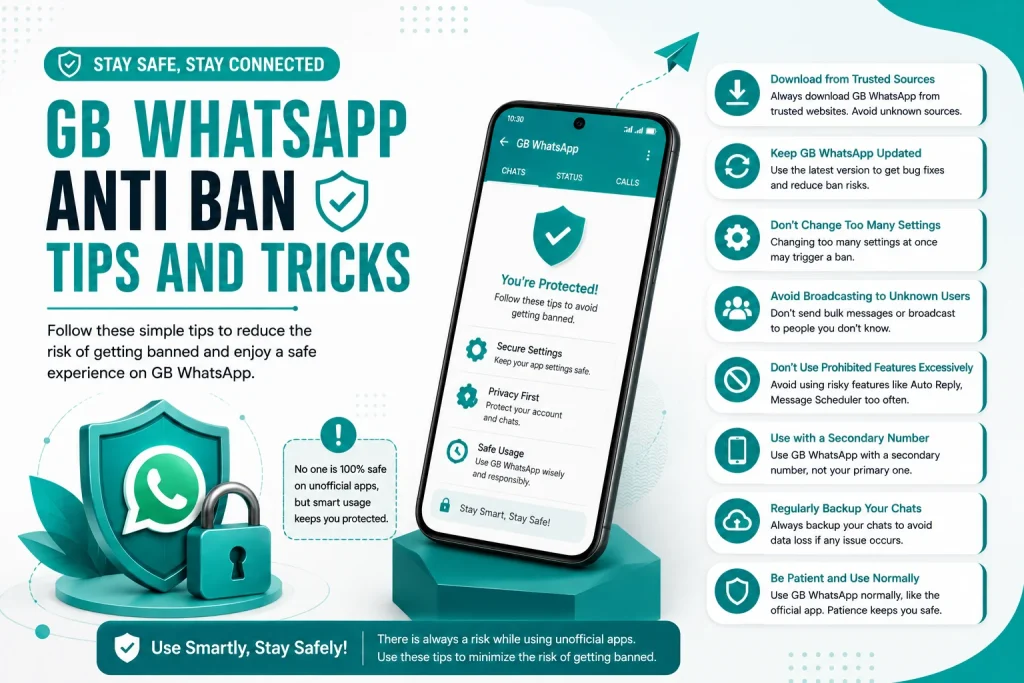
GB WhatsApp Anti Ban Tips and Tricks
One of the biggest concerns for GB WhatsApp users is getting their account temporarily banned by WhatsApp. While the risk is real, it can be greatly reduced with the right habits and settings. This 2026 guide shares the best GB WhatsApp anti ban tips and tricks to keep your account safe while enjoying all the extra features.
Why GB WhatsApp Accounts Get Banned
WhatsApp does not allow modded clients on its platform. When it detects that you are using GB WhatsApp, it may issue a temporary ban ranging from 1 hour to 72 hours. Repeated violations or suspicious activity can lead to longer bans or even permanent suspension. Understanding why bans happen is the first step to avoiding them.
Common Reasons for GB WhatsApp Bans
Here are the most common reasons why GB WhatsApp users get banned.
- Using an outdated version of the app
- Sending bulk messages or spam
- Using automation or bots
- Joining too many groups in a short time
- Receiving many reports from other users
- Using fake or modified GB WhatsApp builds
Tip 1 Always Use the Latest GB WhatsApp Version
The most important anti ban tip is to always update GB WhatsApp to the latest version. Developers release updates that include anti ban patches and server compatibility fixes.
- Check for updates every two weeks
- Download from the official developer website
- Read the changelog before updating
- Restart the app after every update
- Do not use old versions for long periods
Tip 2 Enable Anti Ban Mode in GB WhatsApp
GB WhatsApp has a built in anti ban mode that you should always keep turned on. It reduces the chances of your account being flagged by WhatsApp servers.
- Open GB WhatsApp and go to GBSettings
- Tap on Anti Ban or Privacy settings
- Enable Anti Ban Mode
- Enable Stealth Mode if available
- Save the settings and restart the app
Tip 3 Avoid Sending Bulk Messages
Sending the same message to many people in a short time is one of the fastest ways to get banned. This includes mass broadcasts, group spam, and auto messaging.
- Limit broadcasts to under 50 contacts
- Avoid sending the same message repeatedly
- Do not use auto message tools
- Personalize messages when possible
- Take breaks between bulk actions
Tip 4 Do Not Use Automation or Bots
GB WhatsApp does not support WhatsApp official API, which means using bots or automation tools is a direct violation. This can lead to an instant ban.
- Do not connect GB WhatsApp to any bot service
- Avoid auto reply tools outside of GB WhatsApp
- Do not use third party schedulers
- Keep your usage natural and human like
- Report any suspicious bot behavior in groups
Tip 5 Avoid Joining Too Many Groups Quickly
Joining multiple groups in a short time looks suspicious to WhatsApp. It is better to space out your group activity.
- Join no more than 2 to 3 groups per day
- Leave inactive groups to clean up your list
- Avoid being added to spam groups
- Do not accept every group invite
- Use group invite links carefully
Tip 6 Use a Secondary Number for Risky Activities
If you use GB WhatsApp heavily for features like auto reply or file sharing, consider using a secondary SIM or virtual number. This protects your main number from bans.
- Keep your personal number on official WhatsApp
- Use GB WhatsApp on a secondary number
- Separate business and personal usage
- Switch numbers if one gets banned
- Avoid linking both numbers to the same identity
Tip 7 Update GB WhatsApp from the Same Source
Switching between different GB WhatsApp versions from different developers can trigger bans. Always update from the same trusted source.
- Pick one trusted developer or website
- Stick with that version line for updates
- Avoid mixing GB WhatsApp with FM WhatsApp or YO WhatsApp
- Do not reinstall the app frequently
- Keep your mod base consistent
Tip 8 Reduce Suspicious Activity Patterns
WhatsApp tracks usage patterns to detect modded apps. To stay under the radar, behave like a normal user.
- Do not send hundreds of messages per day
- Avoid late night mass activity
- Use official WhatsApp for sensitive chats
- Take breaks from GB WhatsApp occasionally
- Do not use the app on multiple devices at once
Tip 9 Avoid Reported Behavior in Groups
If other users report your messages or behavior, WhatsApp may issue a ban even if you are not using automation. Always behave respectfully in groups.
- Do not send inappropriate content
- Avoid aggressive marketing in groups
- Respect group rules and admins
- Do not spam promotional links
- Leave groups that are not relevant to you
Tip 10 Keep Your App Updated and Backed Up
Keeping the app updated and your chats backed up ensures you can recover quickly if a ban happens.
- Update GB WhatsApp every two to four weeks
- Back up chats weekly
- Save backup files in two locations
- Use the latest anti ban patch
- Monitor official developer channels for news
Anti Ban Settings Checklist
Here is a quick checklist of anti ban settings to enable in GB WhatsApp.
| Setting | Status |
|---|---|
| Use latest version | Always on |
| Anti ban mode | Enabled |
| Stealth mode | Enabled |
| Avoid bulk messaging | Always |
| Use secondary number | Recommended |
| Avoid automation | Always |
| Limit group joins | 2 to 3 per day |
| Backup chats regularly | Weekly |
| Do not switch mod bases | Always |
| Avoid suspicious patterns | Always |
What to Do If You Get Banned
If your account is temporarily banned, do not panic. Follow these steps to recover quickly.
- Wait for the ban timer to expire, usually 1 to 72 hours
- Switch to the latest anti ban version of GB WhatsApp
- Uninstall the old version after the ban ends
- Reinstall GB WhatsApp and verify your number
- Avoid the behavior that caused the ban in the first place
Final Thoughts on GB WhatsApp Anti Ban Tips
Getting banned on GB WhatsApp is rare if you use the app wisely. By keeping the app updated, enabling anti ban mode, avoiding spam, and behaving like a normal user, you can enjoy all the features of GB WhatsApp with almost zero ban risk. Follow the tips in this 2026 guide and your account will stay safe while you explore the best of GB WhatsApp.
Frequently Asked Questions
How long do GB WhatsApp bans usually last?
Most GB WhatsApp bans are temporary and last between 1 hour and 72 hours. Repeated violations can lead to longer bans.
Can I avoid GB WhatsApp bans completely?
You cannot eliminate the risk entirely, but using the latest anti ban version, avoiding spam, and using a secondary number reduces the risk to almost zero.
Does enabling anti ban mode really work?
Yes, the built in anti ban mode in GB WhatsApp reduces detection by WhatsApp servers and significantly lowers the chance of temporary bans.
Can I use GB WhatsApp and official WhatsApp on the same number?
No, you cannot use both apps with the same number at the same time. Use a secondary SIM or virtual number for GB WhatsApp if you want both.
What is the safest version of GB WhatsApp?
The safest version is always the latest stable release from a trusted developer. Avoid beta or heavily modified versions that may trigger bans.