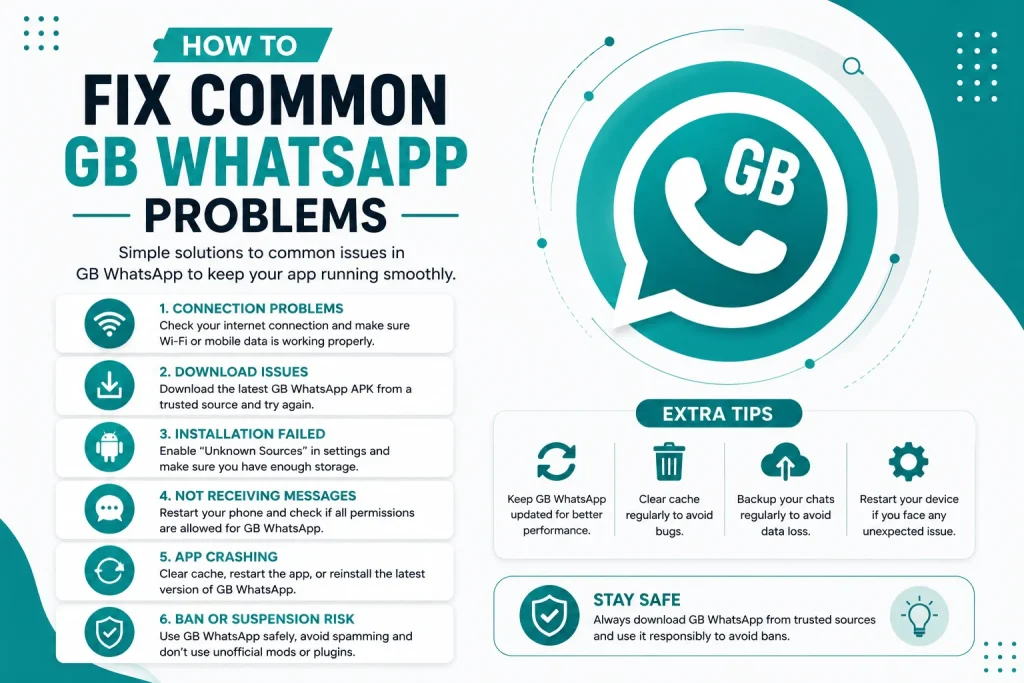
How to Fix Common GB WhatsApp Problems
GB WhatsApp is a powerful modded version of WhatsApp, but like any third party app, it can sometimes run into problems. Crashes, bans, verification errors, and notification issues are the most common complaints from users. In this 2026 guide, you will learn how to fix the most common GB WhatsApp problems quickly and effectively.
Why GB WhatsApp May Have Problems
GB WhatsApp is not an official app, which means it is updated by third party developers and may occasionally have bugs, compatibility issues, or anti-ban triggers. Most issues are easy to fix once you understand the cause. Common reasons include outdated versions, corrupted files, wrong settings, or conflicts with the official WhatsApp installed on the same device.
Problem GB WhatsApp Keeps Crashing
If GB WhatsApp keeps crashing or closing unexpectedly, it is usually caused by a corrupted installation, outdated version, or low memory.
- Update GB WhatsApp to the latest version
- Clear the app cache from phone settings
- Free up at least 200 MB of storage
- Reinstall the APK from a trusted source
- Disable battery optimization for GB WhatsApp
Problem Verification Code Not Received
A common issue users face is not receiving the SMS or call verification code. This usually happens due to network issues or SIM problems.
- Check that your SIM card is active and inserted
- Switch between mobile data and Wi-Fi
- Wait at least 10 minutes before requesting a new code
- Try the call verification option instead of SMS
- Make sure your phone number is entered with the correct country code
Problem Account Banned or Temporarily Suspended
Because GB WhatsApp is a modded app, WhatsApp may temporarily ban accounts that use it. Most bans last between 1 hour and 72 hours.
- Switch to the latest anti-ban version of GB WhatsApp
- Uninstall and reinstall after the ban period
- Avoid using automation or spam features
- Enable anti-ban mode in GB settings
- Do not send bulk messages or suspicious activity
Problem Notifications Not Working
If you are not getting notifications for new messages, it is usually a battery optimization or permission issue.
- Disable battery saver mode for GB WhatsApp
- Allow auto start in your phone security settings
- Enable all notification permissions
- Turn off Do Not Disturb mode
- Re-register your phone number if needed
Problem Media Files Not Downloading
GB WhatsApp allows large media downloads, but sometimes files fail to download due to storage or network issues.
- Check your internet connection
- Free up internal storage
- Clear GB WhatsApp cache
- Make sure media auto-download is enabled in settings
- Try downloading the file manually by tapping it
Problem Chat Backup Not Restoring
If your chats are missing after reinstalling GB WhatsApp, the backup may be in the wrong folder or corrupted.
- Move backup files to the GBWhatsApp folder
- Use the same phone number that was linked to the backup
- Try restoring an older backup file
- Avoid clearing app data before restoring
- Update to the latest version before restoring
Problem Stuck on Loading Screen
If GB WhatsApp gets stuck on the loading or connecting screen, the issue is usually network related or caused by a corrupted database.
- Restart your phone
- Switch between Wi-Fi and mobile data
- Clear app cache and data
- Reinstall the latest GB WhatsApp APK
- Check that your phone date and time are correct
Problem Unable to Send or Receive Messages
This is a common issue that usually comes down to network restrictions or version incompatibility.
- Check your internet connection
- Update GB WhatsApp to the latest version
- Disable VPN if you are using one
- Make sure your date and time settings are automatic
- Re-verify your phone number if needed
Problem Voice or Video Calls Not Working
GB WhatsApp supports voice and video calls, but they may fail if your network is slow or permissions are missing.
- Allow microphone and camera permissions
- Connect to a stronger Wi-Fi network
- Update the app to the latest version
- Restart your phone
- Clear call logs from the app settings
Quick Troubleshooting Table
Here is a quick reference table of the most common GB WhatsApp problems and their fixes.
| Problem | Quick Fix |
|---|---|
| App crashing | Update and clear cache |
| Verification failed | Wait and retry, use call option |
| Account banned | Update anti-ban version |
| Notifications missing | Disable battery optimization |
| Media not downloading | Clear cache, check storage |
| Backup not restoring | Move files to GBWhatsApp folder |
| Stuck loading | Restart phone, reinstall app |
| Messages not sending | Check internet, update app |
| Calls not working | Allow permissions, use Wi-Fi |
| App not installing | Enable unknown sources, re-download |
Best Practices to Avoid GB WhatsApp Problems
To keep GB WhatsApp running smoothly, follow these best practices.
- Always use the latest version from a trusted source
- Avoid using two modded versions on the same device
- Clear app cache once a month
- Keep your phone storage free
- Back up chats regularly
- Do not modify internal app files unless you know what you are doing
When to Reinstall GB WhatsApp
Sometimes reinstalling is the only fix. You should reinstall GB WhatsApp if the app keeps crashing after clearing cache, if verification loops endlessly, or if chats fail to restore from backup. Always back up your chats before reinstalling to avoid losing data.
Final Thoughts on Fixing GB WhatsApp Problems
Most GB WhatsApp problems are easy to solve with the right steps. Whether you are facing crashes, bans, verification issues, or notification failures, this guide covers the most common fixes. Keep your app updated, use trusted sources, and follow best practices to enjoy a smooth GB WhatsApp experience in 2026.
Frequently Asked Questions
Why does GB WhatsApp keep crashing on my Android phone?
GB WhatsApp may crash due to a corrupted installation, outdated version, or low storage. Updating to the latest version and clearing the app cache usually fixes the issue.
How long does a GB WhatsApp ban last?
Most GB WhatsApp bans are temporary and last between 1 hour and 72 hours. Updating to the latest anti-ban version reduces the chance of future bans.
Why am I not getting GB WhatsApp notifications?
Notifications may be blocked by battery optimization, Do Not Disturb mode, or missing permissions. Disable battery optimization and allow all notification permissions for GB WhatsApp.
Can I fix GB WhatsApp without reinstalling?
Yes, most issues can be fixed by updating the app, clearing cache, or adjusting settings. Reinstalling is only needed if other fixes do not work.
Why is my GB WhatsApp stuck on the connecting screen?
A stuck connecting screen is usually caused by network issues, wrong date and time settings, or a corrupted database. Restarting your phone and reinstalling the latest version usually resolves it.